Roles & Permissions
Roles & Permissions
Message Center uses role-based access control (RBAC). Every workspace member has one of four roles: Author, Moderator, Admin, or Super Admin.
Role Summary
| Role | Primary purpose |
|---|---|
| Author | Creates and submits campaigns for moderation |
| Moderator | Reviews and approves or rejects campaigns and sender revisions |
| Admin | Full workspace management — everything an Author and Moderator can do, plus managing members and settings |
| Super Admin | System-wide access across all workspaces and all system settings |
What Each Role Can Do
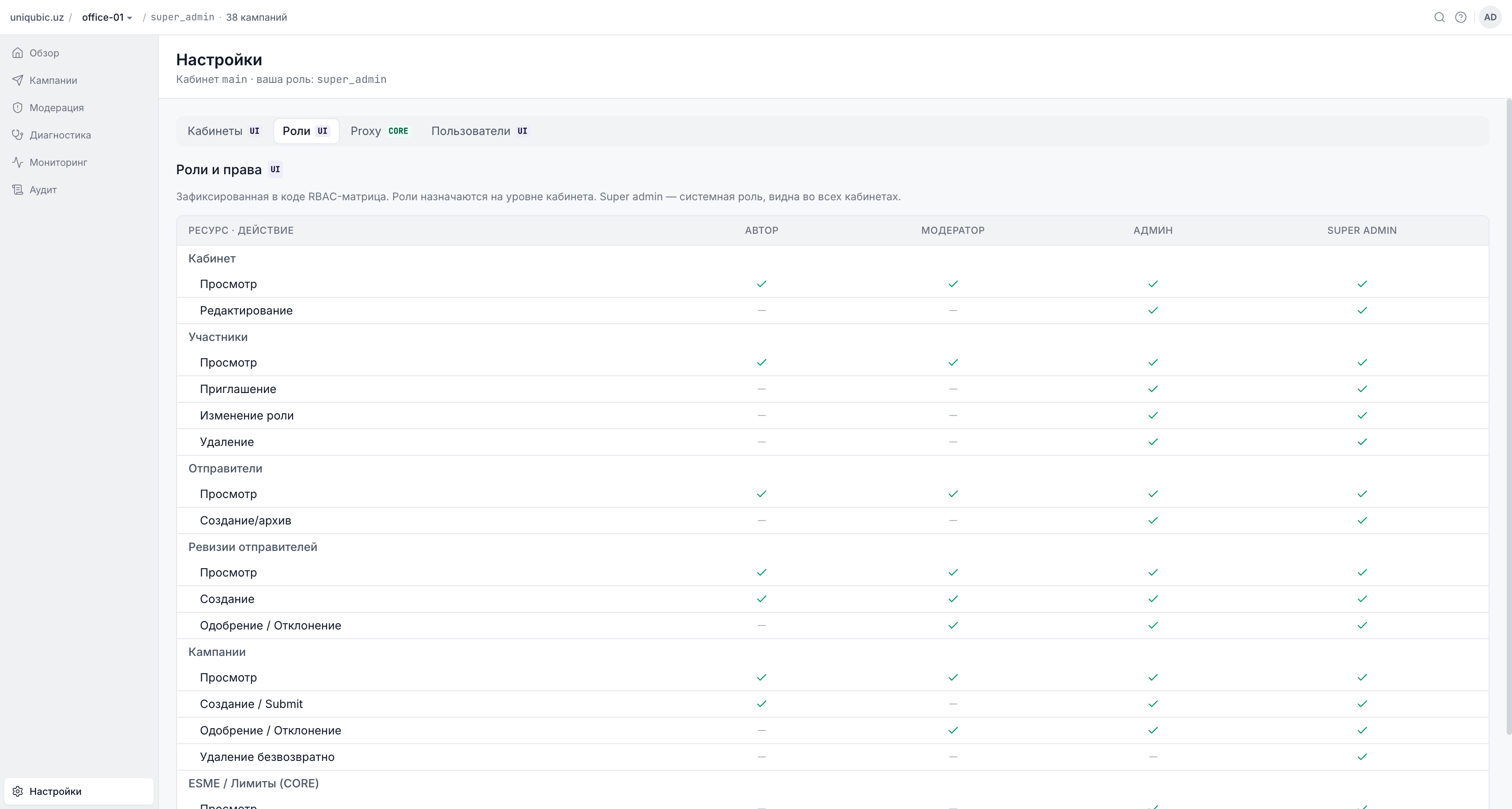
Campaigns
| Action | Author | Moderator | Admin | Super Admin |
|---|---|---|---|---|
| View campaigns | ✓ | ✓ | ✓ | ✓ |
| Create campaign | ✓ | ✗ | ✓ | ✓ |
| Edit campaign | ✓ | ✗ | ✓ | ✓ |
| Submit for moderation | ✓ | ✗ | ✓ | ✓ |
| Archive campaign | ✓ | ✗ | ✓ | ✓ |
| Approve campaign | ✗ | ✓ | ✓ | ✓ |
| Reject campaign | ✗ | ✓ | ✓ | ✓ |
| Delete campaign | ✗ | ✗ | ✗ | ✓ only |
Sender Names
| Action | Author | Moderator | Admin | Super Admin |
|---|---|---|---|---|
| View senders | ✓ | ✓ | ✓ | ✓ |
| Create sender | ✗ | ✗ | ✓ | ✓ |
| Archive sender | ✗ | ✗ | ✓ | ✓ |
| Create/submit revision | ✓ | ✓ | ✓ | ✓ |
| Approve/reject revision | ✗ | ✓ | ✓ | ✓ |
Workspace & Members
| Action | Author | Moderator | Admin | Super Admin |
|---|---|---|---|---|
| View workspace | ✓ | ✓ | ✓ | ✓ |
| Update workspace name | ✗ | ✗ | ✓ | ✓ |
| View members | ✓ | ✓ | ✓ | ✓ |
| Invite members | ✗ | ✗ | ✓ | ✓ |
| Remove members | ✗ | ✗ | ✓ | ✓ |
| Assign roles | ✗ | ✗ | ✓ | ✓ |
| Manage invitations | ✗ | ✗ | ✓ | ✓ |
Navigation & UI Visibility
| Section | Author | Moderator | Admin | Super Admin |
|---|---|---|---|---|
| Overview | ✓ | ✓ | ✓ | ✓ |
| Campaigns | ✓ | ✓ | ✓ | ✓ |
| Senders | ✓ | ✓ | ✓ | ✓ |
| Moderation | ✓ | ✓ | ✓ | ✓ |
| Monitoring | ✗ | ✗ | ✓ | ✓ |
| Diagnostics | ✗ | ✗ | ✓ * | ✓ |
| Audit log | ✗ | ✗ | ✗ | ✓ |
| Settings | ✓ | ✓ | ✓ | ✓ |
| New Campaign button | ✓ | ✗ | ✓ | ✓ |
| Archive workspace | ✓ | ✗ | ✓ | ✓ |
| Master workspace | ✗ | ✗ | ✗ | ✓ |
* Diagnostics requires
ADMIN_DIAGNOSTICS_ENABLED=truefor Admin role. Without it, only Super Admin can see Diagnostics.
The is_moderator Flag
An Author membership can have an additional is_moderator flag set by a workspace Admin. When this flag is enabled:
- The author also gains all Moderator permissions (approve/reject campaigns and sender revisions)
- The author's role does not change — they remain an Author in all other contexts
- This flag is meaningless for Moderator and Admin roles
Think of it as: "Author who can also moderate in this specific workspace."
This flag is set in Settings → Members by clicking the user row and toggling the + Moderator checkbox (visible only when the selected role is Author).
Audit Log Access
The Audit log page is accessible only to Super Admins. However, all roles can see the Audit tab within a specific campaign's detail page — limited to actions on that campaign.
Super Admin Capabilities
Super Admins bypass all RBAC checks and have full access to everything:
- All workspaces (including Master cross-workspace view)
- All system settings (Proxy, ESME, Users)
- Delete campaigns (only Super Admins can permanently delete)
- Block / restore / reset password for any user
- View the full system-wide Audit log
Super Admin is a system-level role (stored in the user record, not the membership). It cannot be assigned through the workspace Settings UI — it requires direct database or script-level configuration.
Next Steps
- Settings & Members — assign roles to workspace members
- Moderation — understand the moderator workflow