Overview Dashboard
Overview Dashboard
The Overview page is your command center. It gives you a real-time snapshot of everything happening in your workspace — how many campaigns are running, how many messages have been delivered, and whether the system is healthy.
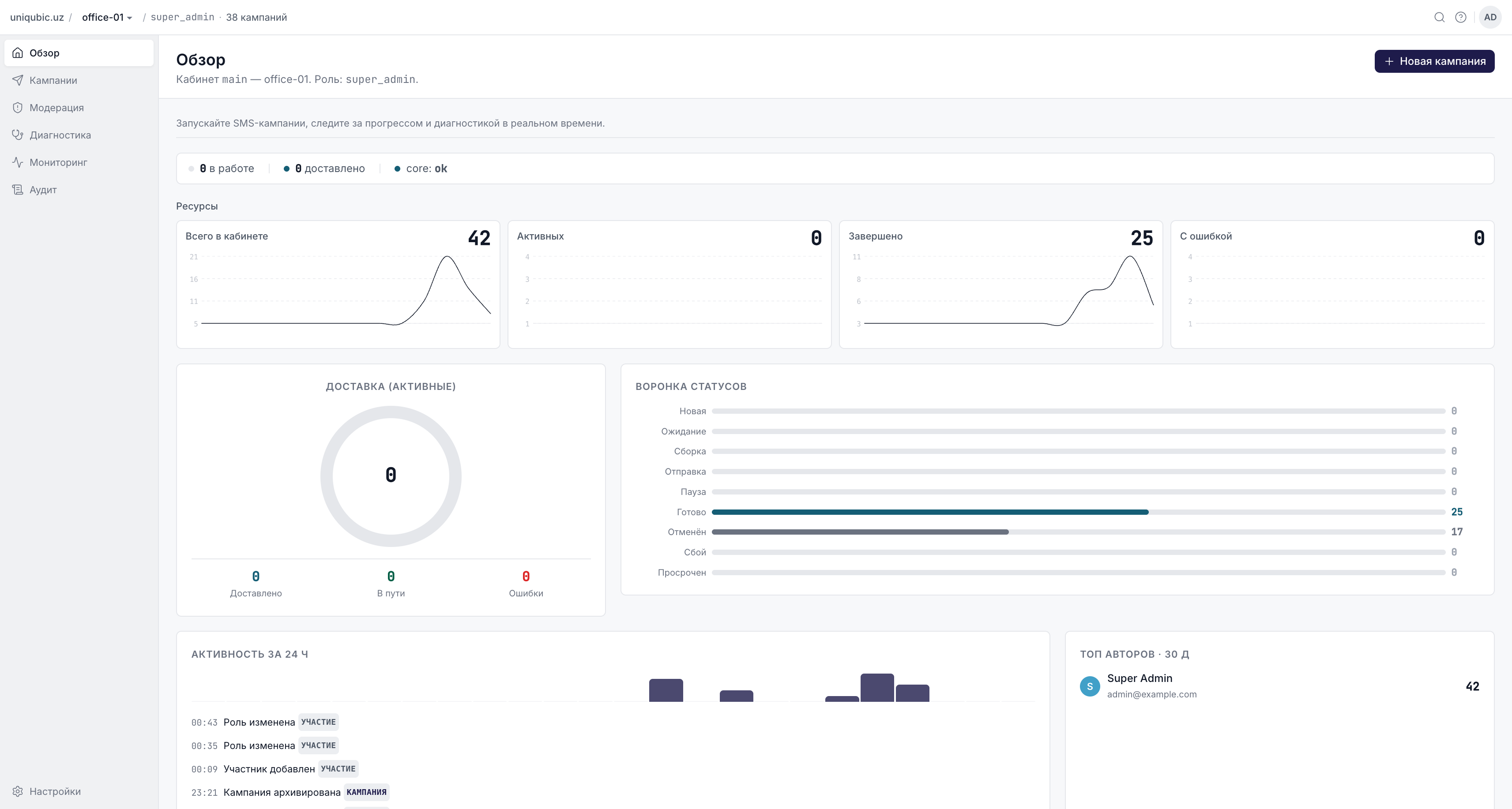
KPI Tiles
At the top of the Overview you will find four tiles:
| Tile | Meaning |
|---|---|
| Total in workspace | Total number of campaigns ever created in this workspace |
| Active | Campaigns currently in a live state: Building, Pending, Sending, or Paused |
| Completed | Campaigns that finished successfully (status: Done) |
| Failed | Campaigns that ended with an error or expired |
Live Pulse
The pulse strip shows real-time throughput for active campaigns:
- In flight — messages currently being processed by the dispatcher
- Delivered — messages successfully delivered in the last polling interval
- Core status —
ok(core API is reachable) ordown(core API is unavailable)
When core is down, the pulse shows
downand a banner appears at the top of the page. New campaigns cannot be started until core recovers.
Delivery Donut Chart
The donut visualizes the delivery breakdown for all active campaigns:
| Segment | What it represents |
|---|---|
| Delivered | Messages confirmed as successfully received |
| In flight | Messages submitted to the carrier but not yet confirmed |
| Errors | Messages that failed delivery (final status) |
The chart updates automatically while campaigns are active. It shows
loading progress…for up to ~30 seconds after a campaign starts while the first batch of delivery reports arrives.
Status Funnel
The status funnel shows how many campaigns are in each lifecycle stage:
New → Building → Pending → Sending → Done
                                   ↘ Failed / Cancelled / Expired
The New row in the funnel also shows pending moderation — the count of campaigns waiting for moderator approval. These do not appear in the main Campaigns list; they appear only in the Moderation queue.
Activity — Last 24 Hours
A timeline of SMS messages sent and failed in the past 24 hours, broken down by hour. Use this to spot unexpected spikes or drops in delivery volume.
Top Authors (Last 30 Days)
A ranked list of users who have created the most campaigns in the past 30 days. Useful for workspace admins to understand usage patterns.
Recent Campaigns
The bottom section shows the 10 most recently created campaigns with their current status. Click any row to open the campaign detail page. The All campaigns → link takes you to the full campaigns list.
System Diagnostics
A compact health panel shows:
| Check | What it means |
|---|---|
| Core API | Whether the core SMS dispatch service is reachable |
| DB schema | Current MongoDB schema version (must match expected version) |
| Audit retention | Number of days audit logs are retained (default: 90) |
| Audit fallback file | Should always show file empty ✓ in production |
If Audit fallback file shows a non-zero size, it means Mongo was temporarily unreachable and audit events were buffered to disk. They will be automatically re-ingested on the next write — no action needed unless the file keeps growing.
Next Steps
- Creating a Campaign — create your first campaign
- Monitoring & Diagnostics — deeper metrics in Grafana