Archive & Restore
Archive & Restore
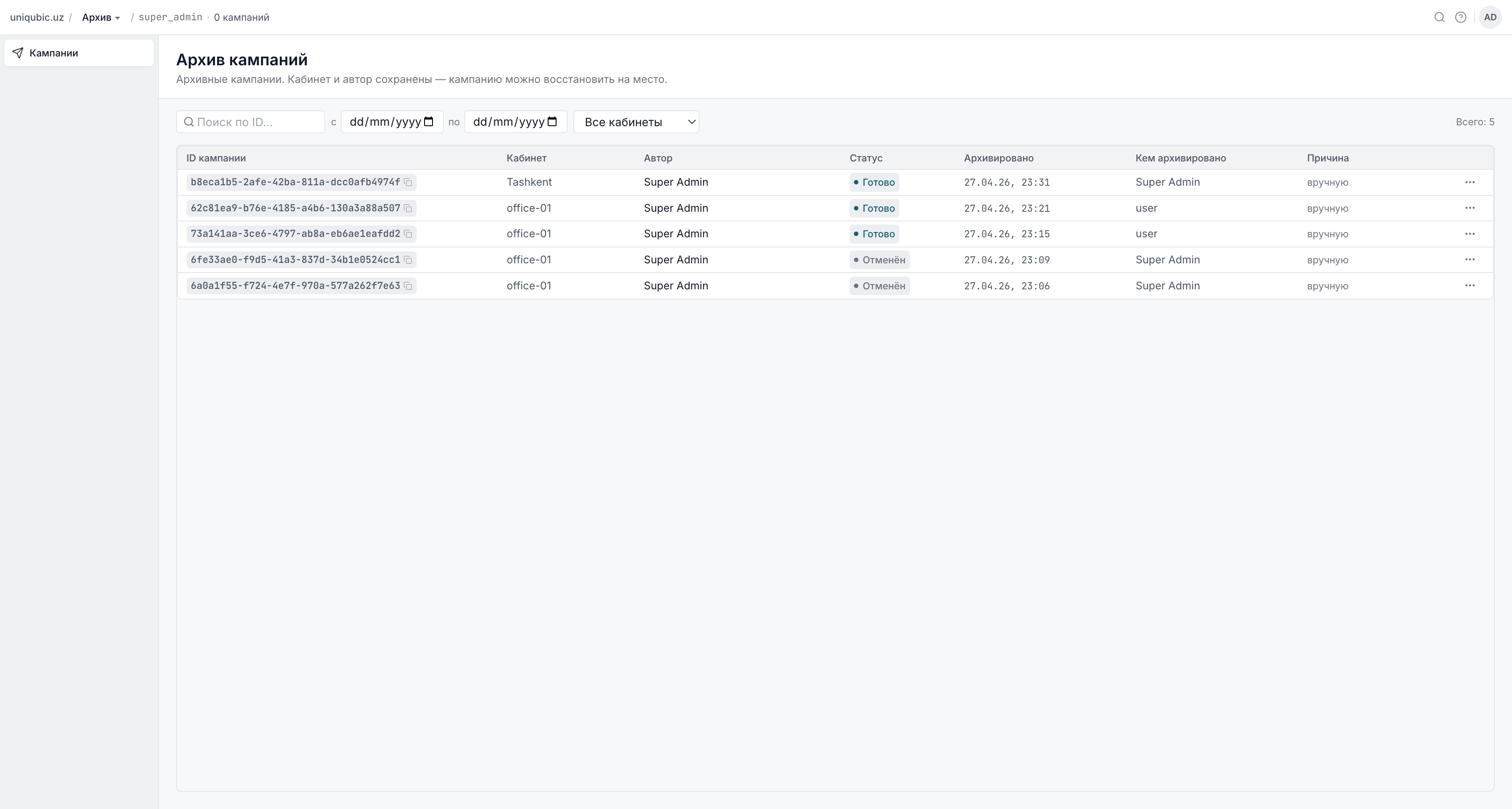
Archiving a campaign hides it from the main Campaigns list without deleting it. Archived campaigns are accessible from the Archive workspace and can be restored at any time.
Which Campaigns Can Be Archived
Only campaigns in one of these terminal or new statuses can be archived:
| Status | Can archive? |
|---|---|
| New | ✓ |
| Done | ✓ |
| Cancelled | ✓ |
| Failed | ✓ |
| Expired | ✓ |
| Building | ✗ |
| Pending | ✗ |
| Sending | ✗ |
| Paused | ✗ |
Active campaigns (Building, Pending, Sending, Paused) cannot be archived — stop them first.
How Archive Works
Archive is flag-based, not a data move. When you archive a campaign:
- An
archived_attimestamp is set on the campaign record - The campaign's
workspace_iddoes not change - The campaign disappears from the main Campaigns list
- The campaign appears in the Archive workspace view
This means the campaign is never truly "moved" — it simply becomes invisible in the main list until restored.
Archiving a Campaign
From the campaign list:
- Find the campaign in the Campaigns list (status must be archivable — see table above).
- Click the ⋯ (more actions) button on the row.
- Select Archive.
- Confirm in the dialog: "The campaign will be hidden from the main list. You can restore it from the archive."
From the campaign detail page:
- Open the campaign.
- In the action bar at the top-right, click Archive.
- Confirm in the dialog.
You need the
campaign: archivepermission. Authors and Admins can archive. Moderators cannot.
Viewing Archived Campaigns
Switch to the Archive workspace using the workspace switcher in the sidebar. The archive shows all campaigns you have archived across your workspaces.
- Super Admins see all archived campaigns across all workspaces.
- Regular users see only campaigns from workspaces they belong to.
Pure moderators (users whose only role is Moderator, with no other workspace memberships) cannot access the Archive workspace.
Restoring a Campaign
One-click restore (active creator)
If you are the creator of the archived campaign and your account is still active:
- Open the campaign in the Archive view.
- Click Restore.
- Confirm: "The campaign will be returned to the main list."
The campaign reappears in the main Campaigns list of its original workspace.
Restore dialog (deleted creator or legacy archive)
If the original creator's account has been deleted, or if the campaign was archived before the current flag-based system (legacy workspace-move archives):
- A Restore Campaign dialog appears instead of the direct restore button.
- Super Admin must select the target workspace to restore the campaign into (since the original workspace reference may be lost for legacy records).
- Confirm the restore.
Archiving vs Deleting
| Archive | Delete | |
|---|---|---|
| Data preserved | ✓ | ✗ |
| Reversible | ✓ | ✗ |
| Visible in Archive | ✓ | ✗ |
| Who can do it | Author, Admin, Super Admin | Super Admin only |
| Campaign on core | Unchanged | Best-effort cancel |
Use Archive for normal housekeeping. Delete is a Super Admin action reserved for campaigns that should never have been created (e.g. test submissions, invalid data).
Next Steps
- Managing Campaigns — campaign list and actions
- Settings & Members — workspace member management